 Ekstre Analiz
Why a shared account?
A household budget is usually two people's spending: one does the grocery run, the other pays the bills, and rent and building fees come out of a shared pocket. The shared account puts all of it in one place. You both see and add to the same data, so "how much did we spend this month?" has one answer.
- One budget: statements, income and expense entries, cards and subscriptions are the same on both phones.
- Instant updates: when someone adds something, the other phone gets a notification and refreshes right away.
- Shared reminders: due date reminders reach everyone on the account.
- One Pro: the owner's Pro membership also covers the person who joins with Can edit.
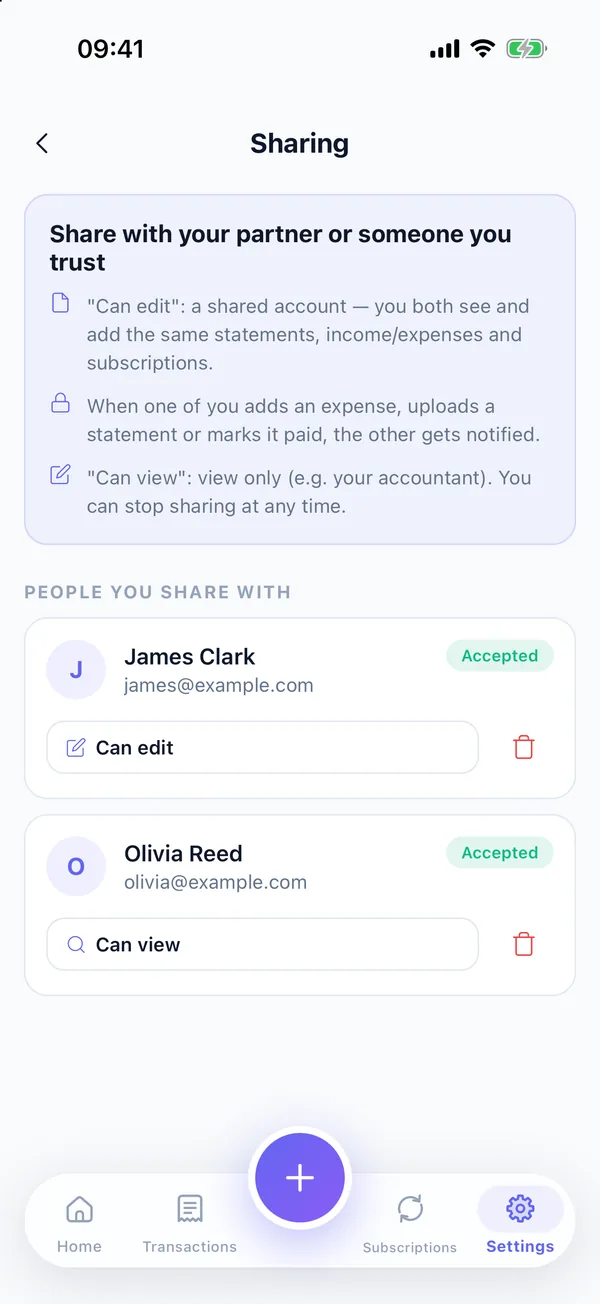
Two permissions: Can edit and Can view
| Permission | Best for | What they can do |
|---|---|---|
| Can edit | Your partner or a family member | Joins the shared account; sees and adds the same statements, income, expenses, cards and subscriptions. What they add reaches you as a notification. |
| Can view | Your accountant or someone you trust | Sees your data but cannot change anything: total balance, next payment, statements, recent spending and subscriptions. |
You can change the permission later or stop sharing at any time.
When are notifications sent?
Notifications arrive in the recipient's app language and never go to the person who made the change:
| Event | Example notification |
|---|---|
| Expense added | James added an expense 💸 · $45.00 · Food |
| Income added | James added income 💰 · $4,200.00 · Salary |
| Statement uploaded | James uploaded the Chase statement 📄 · $1,411.93 · due Oct 24 |
| Statement paid | James marked the Chase statement as paid ✅ |
| Recurring entry | Monthly entry added 🔁 · Rent · $1,800.00 |
Turn these on or off in Settings > Notification preferences > Shared account activity. Due date reminders reach everyone on the account separately.
How to set up a shared account
- You both need an account. Sign in with Apple or Google. Guest data only lives on one phone, so sharing needs an account.
- The owner needs cloud backup. The shared account runs on cloud backup; Pro or the Cloud plan is enough.
- Add a person. On the Settings > Sharing screen, each additional person is a one-time +1 User purchase.
- Send the invite. Enter your partner's email in the app, choose the permission (Can edit or Can view) and tap Send Invite.
- Accept the invite. On their phone, your partner opens Settings > Sharing > Shared with you and accepts. For a Can edit invite, they tap Use on this phone and choose what happens to the data already on their phone: Add them to the shared account or Keep them separate (back when you leave).
That is all. Both phones now show the same data, and when one of you adds something, the other is notified.
Leaving or stopping sharing
When you leave the shared account, the shared data is removed from that phone and any data you kept separate comes back. If the owner stops sharing, the other phone automatically switches back to its own data and shows an alert in the app.
Privacy
The shared account works through cloud backup: the person you share with sees your data from your cloud copy. In cloud backup, merchant names, descriptions, notes and card details are stored encrypted with AES-256 on the server; because the key is managed server-side, this is not end-to-end encryption. Your statement PDFs are still read on your phone and never uploaded for analysis. See the security page for details.
Frequently asked questions
Do we both need Pro for a shared account?
No. The shared account runs on the owner's cloud backup, so the owner needs Pro or the Cloud plan. The owner's Pro membership also covers the person who joins with Can edit. Each additional person is added with a one-time +1 User purchase.
Does the person I invite need an account?
Yes. The invite goes to an email address, and the person needs an account in the app with that same email. Guest data only lives on one phone, so sharing needs an account first.
When are notifications sent?
When someone on the shared account adds an expense or income, uploads a statement, marks a statement as paid, or a monthly recurring entry is added, the other person is notified. The person who made the change is not. Due date reminders reach everyone on the account.
What happens to my data if I leave?
When you leave, the shared data is removed from that phone. If you chose to keep your own data separate when joining, it comes back when you leave. If the owner stops sharing, the phone switches back to its own data.
How does the shared account affect my privacy?
The shared account works through cloud backup; the person you share with sees your data from your cloud copy. In cloud backup, merchant names, descriptions, notes and card details are stored encrypted with AES-256, but this is not end-to-end encryption. Statement PDFs are still read on the phone and never uploaded.